 |
PolyDiM
C++ library for POLYtopal DIscretization Methods
|
| |
PolyDiM
C++ library for POLYtopal DIscretization Methods
|
This section provides and explains the workflow of a standard example that illustrate how to use the PolyDiM library. Each provided example demonstrates the capabilities of the PolyDiM base classes when solving partial differential equations in one, two, or three spatial dimensions.
The available base classes are organized into the following namespaces:
See [9] for a complete description of the library and its theoretical foundations.
Available C++ examples
Elliptic_PCC_2DElliptic_PCC_1DElliptic_PCC_3DBrinkman_DF_PCC_2DStokes_DF_PCC_3DNavierStokes_DF_PCC_2DElastic_PCC_2DParabolic_PCC_2DParabolic_PCC_BulkFace_2DElliptic_MCC_2DElliptic_MCC_3DEach example name follows the pattern <Problem>_<LocalSpace>_<Dimension>:
Elliptic, Parabolic, Stokes, NavierStokes, Brinkman, Elastic, and so on.1D, 2D or 3D.In the following, we explain step by step the structure of the Elliptic_PCC_2D example. All the other examples follow a similar organization.
The program first generates the computational mesh and exports it in VTK format for visualization. Subsequently, the geometric quantities required to define the selected local basis functions are computed through the following code:
The mesh object stores the following information:
0 denotes an interior vertex, i.e., no boundary condition is associated with it.0.0.An example of mesh marker assignment is shown in the following figure: 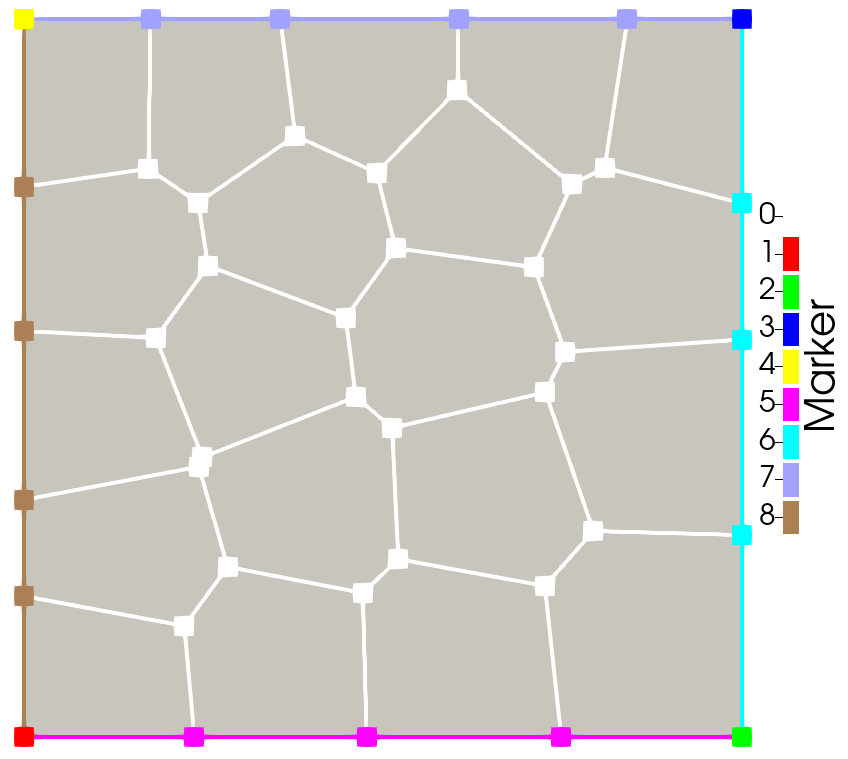
PolyDiM relies on the GEometry for DIscretization MEthods (GEDiM) library [8] to manage mesh data structures. GEDiM has been developed by the authors and is fully integrated into PolyDiM.
All provided 2D examples support concave polygonal elements. Three-dimensional concave polyhedral elements are also supported, although they are not enabled by default. To use them, the routines that compute the geometric properties of concave elements must be explicitly invoked.
PolyDiM can solve a broad range of partial differential equations (PDEs), including scalar and vector-valued problems, as well as both linear and nonlinear formulations.
To define a test problem, the following information must be provided:
A test case is defined as an implementation of the following interface:
The interface above gathers all the information required to solve a diffusion–advection problem. Each test case provides a specific set of problem data and can be executed on different meshes, using different numerical methods and polynomial orders to assess accuracy and convergence properties. These simulation parameters can be configured through the Parameters.ini file located in the build directory associated with each example.
In particular, boundary conditions are assigned through a C++ map that associates each mesh marker with the corresponding boundary condition type.
For instance, the following map
produces the following output: 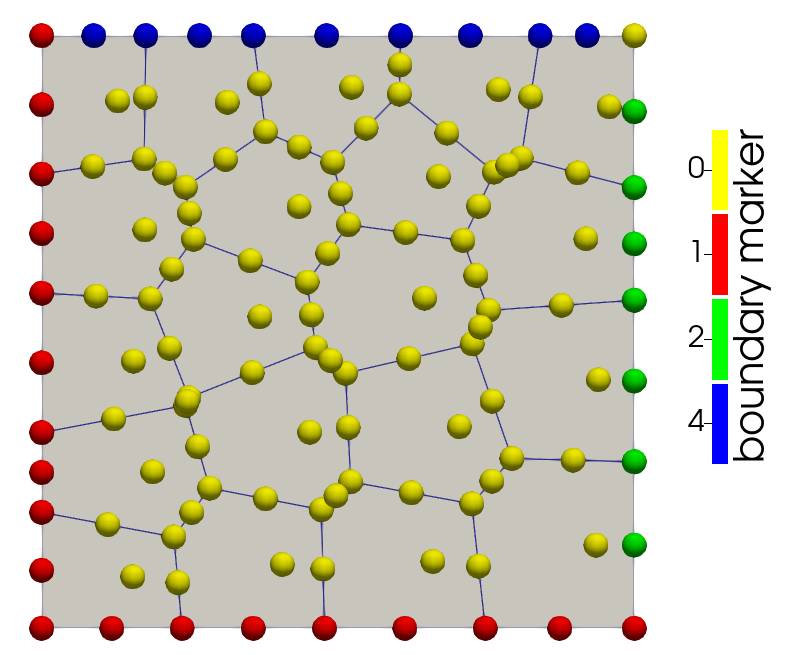
The library provides examples for the following classes of boundary value problems.
Given a polytopal domain \(\Omega \subset \mathbb{R}^d\), with \(d=1,2,3\), \begin{equation} \begin{cases} \nabla \cdot (- D \nabla u) = f & \text{in } \Omega,\\ u = g_D & \text{on } \Gamma_D, \\ D \nabla u \cdot \mathbf{n} = g_N & \text{on } \Gamma_N \end{cases} \end{equation}
This problem can be solved using both primal (Elliptic_PCC_1D, Elliptic_PCC_2D, Elliptic_PCC_3D) and mixed (Elliptic_MCC_2D, Elliptic_MCC_3D) formulations. For the primal version of the method, this problem can be also solved with standard finite element method on triangles (tetrahedra) or quadrilateral (hexahedra). Moreover, the Z-FEM methods are also available [10].
For the Elliptic_PCC_2D, an example of how to use SUPG stabilizing is provided for advection-dominated problem.
Given a polytopal domain \(\Omega \subset \mathbb{R}^d\), with \(d=2,3\), \begin{equation} \begin{cases} \nabla \cdot \mathbf{\sigma} = f & \text{in } \Omega,\\ \mathbf{u} = g_D & \text{on } \Gamma_D, \\ \mathbf{\sigma} \cdot \mathbf{n} = g_N & \text{on } \Gamma_N \end{cases} \end{equation} where \(u\) is a vector-valued function and \(\mathbf{\sigma} = -\mu \mathbf{\epsilon}(\mathbf{u}) + \lambda (\nabla \cdot \mathbf{u}) \mathbf{I}\).
Given a polytopal domain \(\Omega \subset \mathbb{R}^d\), with \(d=2,3\), \begin{equation} \begin{cases} \nabla \cdot \mathbf{\sigma} + \mathbf{K}^{-1}\mathbf{u} = f & \text{in } \Omega,\\ \mathbf{u} = g_D & \text{on } \Gamma_D, \\ \mathbf{\sigma} \cdot \mathbf{n} = g_N & \text{on } \Gamma_N \end{cases} \end{equation} where \(u\) is a vector-valued function and \(\mathbf{\sigma} = -\mu \nabla \mathbf{u} + p \mathbf{I}\).
PolyDiM provides also an example to deal with the Navier-Stokes equations.
We additionally demonstrate the use of PolyDiM for coupled bulk–surface problems in two spatial dimensions [13]. In particular, we solve the following parabolic coupled problem: \begin{equation} \begin{cases} \frac{\partial u^{2}}{\partial t} - d^2 \Delta u^2 + \gamma^2 u^2 = f^2 &\mathbf{x} \in \Omega,\ t \in [0,T]\\ \frac{\partial u^1}{\partial t} - d^1 \Delta_{\Gamma} u^1 + \gamma^1 u^1 + \nabla u^2 \cdot \mathbf{n} = f^1 &\mathbf{x} \in \Gamma,\ t \in [0,T]\\ \nabla u^2 \cdot \mathbf{n} = -\alpha u^2 + \beta u^1 & \mathbf{x} \in \Gamma,\ t \in [0,T], \end{cases} \label{eq:bulksurfaceproblem} \end{equation} where $\Delta_{\Gamma}$ is the Laplace-Beltrami operator and superscripts $2$ and $1$ refer to bulk and surface data, respectively.
The Degrees of Freedom (DOFs) Manager is responsible for numbering all degrees of freedom associated with the discrete problem.
Given a reference element that specifies the number of DOFs attached to each 0D, 1D, 2D, and 3D mesh entity, the DOF Manager assigns consecutive global indices to every mesh entity according to the chosen discretization.
The exact distribution of DOFs depends on the selected base class. Mesh entities on which strong (essential) boundary conditions are imposed do not receive standard DOFs. Instead, the DOF Manager assigns them a separate set of indices, referred to as strong degrees of freedom (STRONGs).
Consequently, the library maintains two independent counters:
See [9] for further details.
An example of how the DOF managers works is shown in the following figures: 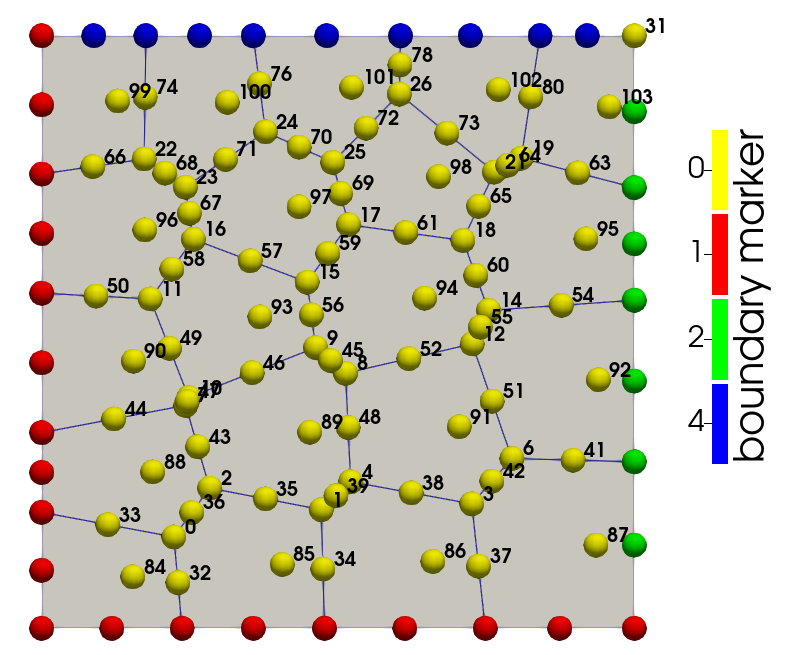
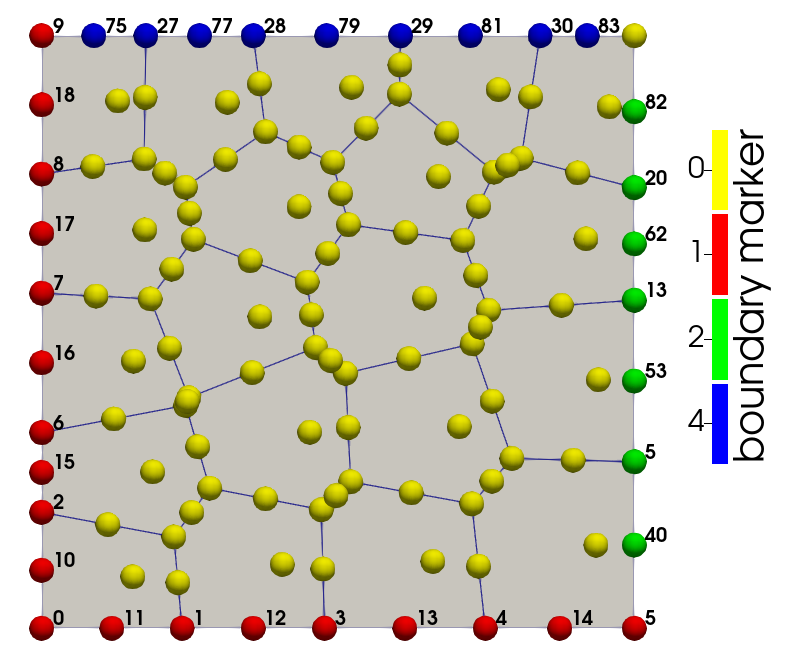
The following code produces the global system matrix \(\mathbf{A} \in \mathbb{R}^{N^{\text{DOF}} \times N^{\text{DOF}}}\) and the right-hand side \(\mathbf{b} \in \mathbb{R}^{N^{\text{DOF}}}\), where \(N^{\text{DOF}}\) is the total number of degrees of freedom. A vector \(\mathbf{u}_S \in \mathbb{R}^{N^{\text{STRONG}}} \) is also built that contains the values of strong degrees of freedom, that are computed exactly thanks to the boundary data.
GeDiM provides to PolyDiM different interfaces to linear algebra library (Eigen, Petsc, atc). All solver interfaces are designed to operate with the generic classes Gedim::ISparseArray and Gedim::IArray, which represent the sparse matrices and vectors of the linear system, respectively. This level of abstraction in the linear algebra layer, if used by the user, enables to switch between different solvers (such as EIGEN, PETSC, and LAPACK) with ease and without altering the core components of the code, such as the assembly process.
Each example includes functions for exporting the computed degrees of freedom, the numerical solution, and its derivatives to ParaView. When an exact solution is available, routines for error computation are also provided.
Furthermore, PolyDiM computes statistics related to the accuracy of the elemental matrices, allowing a detailed assessment of the method's performance.
 1.9.8
1.9.8